
The board
Every live job on one board
Your workshop’s jobs, set out in sections you build yourself, and updated live on every screen in the workshop.
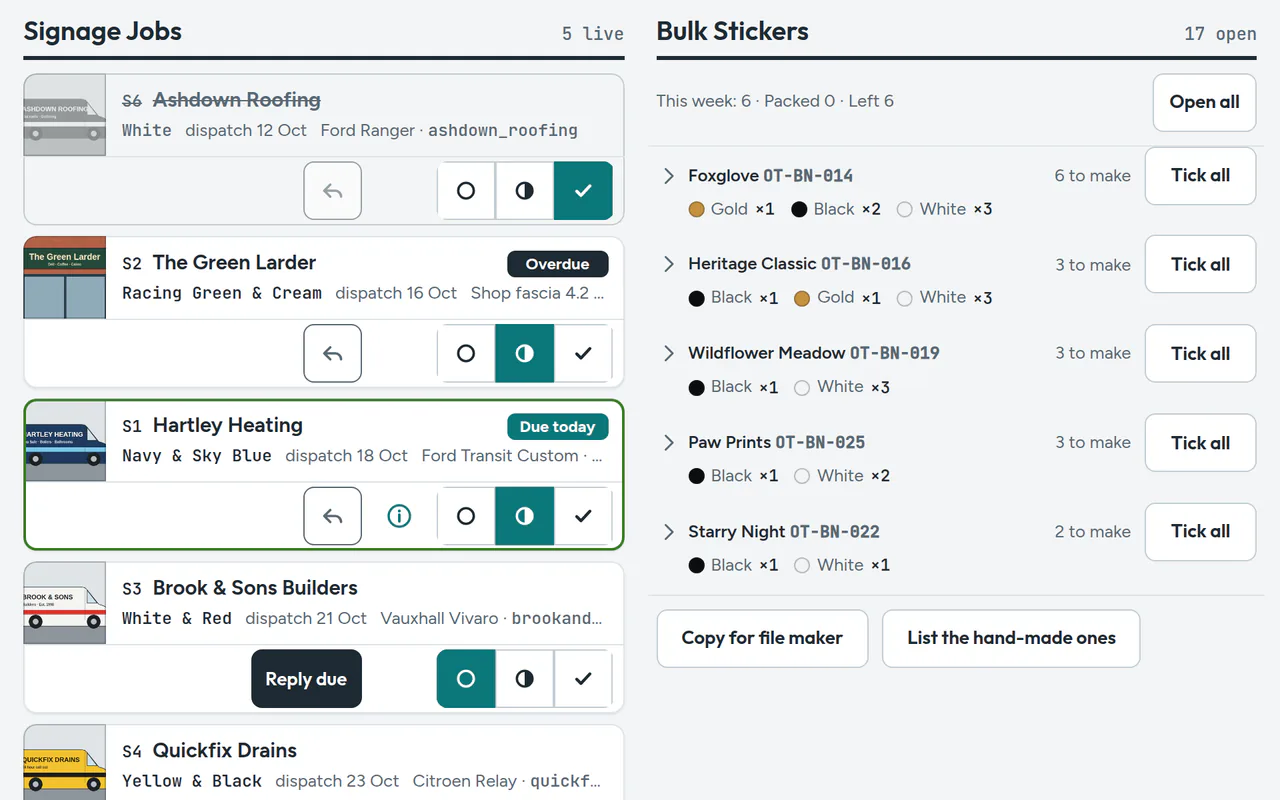
Sections you arrange
Start with a blank board and add sections for the way you work: Standard Orders, Bulk Orders, Replacements and Custom Orders. Name them, set their width, put them in order and hide the ones you don’t need this season.
Strips you read at a glance
Each job is a strip with its picture, its colours and their codes, its dispatch date and its status: Not started, In progress or Done. Due today is ringed and finished work goes flat. Nothing jumps about when you tick it off.
Bulk Orders as pick lists
Sections of small orders, like bin stickers, become pick lists: this week’s counts by design and by colour, with how many to make.
- Tick lines one at a time or all at once
- Edit or remove a single line
- Make your own hand-made list
File makers
If you make cutting files with Illustrator scripts, link a script to a product and ordertrack hands it the week’s lines, ready to run on your workshop computer.
The whole team, live
Owners and staff each sign in with their own account. Changes show on every tablet, phone and computer straight away.
Print lists and an archive
Print a clean list for the bench. Finished jobs file themselves under the month they were done, by section.
Run your day from the board
Free during early access, with no card needed. Request an invite and we’ll be in touch.